
In this blog, I’ll walk you through how to set up and run Node.js on your computer, explore its essential features, and build real-world applications step by step. From writing your first simple program to diving into advanced tools, libraries, and frameworks,everything you need is covered.
Node.js have completely changed how we build websites, letting JavaScript code run on servers, not just in web browsers. If you’re excited to create fast, powerful internet applications and use your JavaScript skills for the ‘behind-the-scenes’ work, then learning Node.js will be an incredibly rewarding journey. This easy-to-follow guide will teach you everything you need to know, whether you’re a complete beginner or already have some coding experience, this guide is here to help you master Node.js from the ground up.
By the end, you’ll have a strong understanding of how Node.js works and how to use it effectively in backend development. Let’s begin your journey to becoming a Node.js master in 2025!
Table of contents:
- What is Node.js?
- Why to choose Node JS?
- How to Download and Install Node.js?
- How to Create Your First Node.js Program?
- Essential Node.js Concepts You Need to Know
- Advanced Node.js Concepts
- Conclusion: Your Journey with Node.js Begins Now!
- FAQ’s
What is Node.js?
Node.js is a free and open-source tool that lets you run JavaScript code outside of a web browser.
It’s built on Chrome’s V8 engine, which makes it fast and efficient. Unlike traditional server-side languages, Node.js allows developers to use JavaScript for both the front end and the back end. This makes coding smoother and helps avoid switching between different programming languages.
Why to choose Node JS?
Node.js comes with several strong features that make it a popular choice for building modern web applications:
1. Large Library of Tools (npm):
With npm (Node Package Manager), developers have access to thousands of ready-made packages and modules, making it easier to add new features or speed up development.
2. Non-blocking, Event-Driven Design:
Node.js uses a single thread to handle multiple requests at once. Instead of waiting for one task to finish before starting another, it keeps moving, which makes it great for apps that need to handle a lot of data or real-time updates.
3. Fast Performance:
Node.js runs on Google’s V8 engine, which turns JavaScript into machine code quickly. This means your code runs fast and efficiently.
4. Easy to Scale:
Thanks to its lightweight design, Node.js apps can grow and handle more users or traffic without major changes to the code.
How to Download and Install Node.js (Step-by-Step Guide)
Before you start building apps with Node.js, you’ll need to install it on your computer. For most users, it’s best to download the LTS (Long-Term Support) version because it’s stable and reliable for real-world projects.
1. Download Node.js:
Go to the official Node.js website and download the installer for your operating system (Windows, macOS, or Linux). Choose the LTS version for the best compatibility and performance.
2. Run the Installer:
Open the downloaded file and follow the instructions. Stick with the default settings unless you have specific needs. This will also install npm (Node Package Manager) automatically.
3. Check Your Installation:
Once installed, open your terminal (or Command Prompt) and type the following commands to check if everything is working: bashCopyEditnode -v npm -v These commands will show the versions of Node.js and npm currently installed.
4. Keep Node.js Updated:
To stay up to date with the latest features and security fixes, make sure to occasionally check for the latest Node.js version and update it when needed.
How to Create Your First Node.js Program?
Let’s write a classic “Hello, World!” program to confirm your setup and get a feel for Node.js.
- Create a new file named
app.js. - Add the following code:JavaScript
console.log("Hello, Node.js World!"); - Save the file.
- Open your terminal or command prompt, navigate to the directory where you saved
app.js, and run the file using thenodecommand:Bashnode app.jsYou should seeHello, Node.js World!printed in your terminal. Congratulations, you’ve just run your first Node.js tutorial for beginners program!

Essential Node.js Concepts You Need to Know
1.Node Package Manager (NPM):
NPM is a key tool for working with Node.js. It’s more than just a package manager—it gives you access to thousands of reusable code libraries. You can use NPM to install packages, manage project dependencies, and run custom scripts.
Basic NPM Commands:
● npm init:
Initializes a new Node.js project by creating a package.json file to manage project metadata and dependencies.

● npm install <package-name>:
Installs a specific package into your project. For example, to install Express:

2. Modules: Organizing Your Code
Node.js follows the CommonJS module system, allowing you to break your application into smaller, reusable files.
● Exporting:
To make code available from one file to another, use module.exports (or exports for multiple exports).
math.js

● Importing (Requiring):
To use an exported module in another file, use require().
app.js

3. Asynchronous Programming: The Node.js Superpower
Node.js excels at handling asynchronous operations, which are crucial for high-performance applications that involve I/O operations (like reading files or making network requests).
● Callbacks
The traditional way to handle asynchronous operations in Node.js is by using callbacks. A function is passed as an argument to another function and is executed once the task completes.

● Promises
Promises provide a more structured way to handle asynchronous operations. They help avoid deeply nested callbacks (often referred to as “callback hell”) and make code more readable and manageable.

● Async/Await
async/await is syntactic sugar built on top of Promises. It allows asynchronous code to be written in a style that looks synchronous, significantly improving readability and error handling.

4. The Event Loop: Node.js’s Non-Blocking Heartbeat
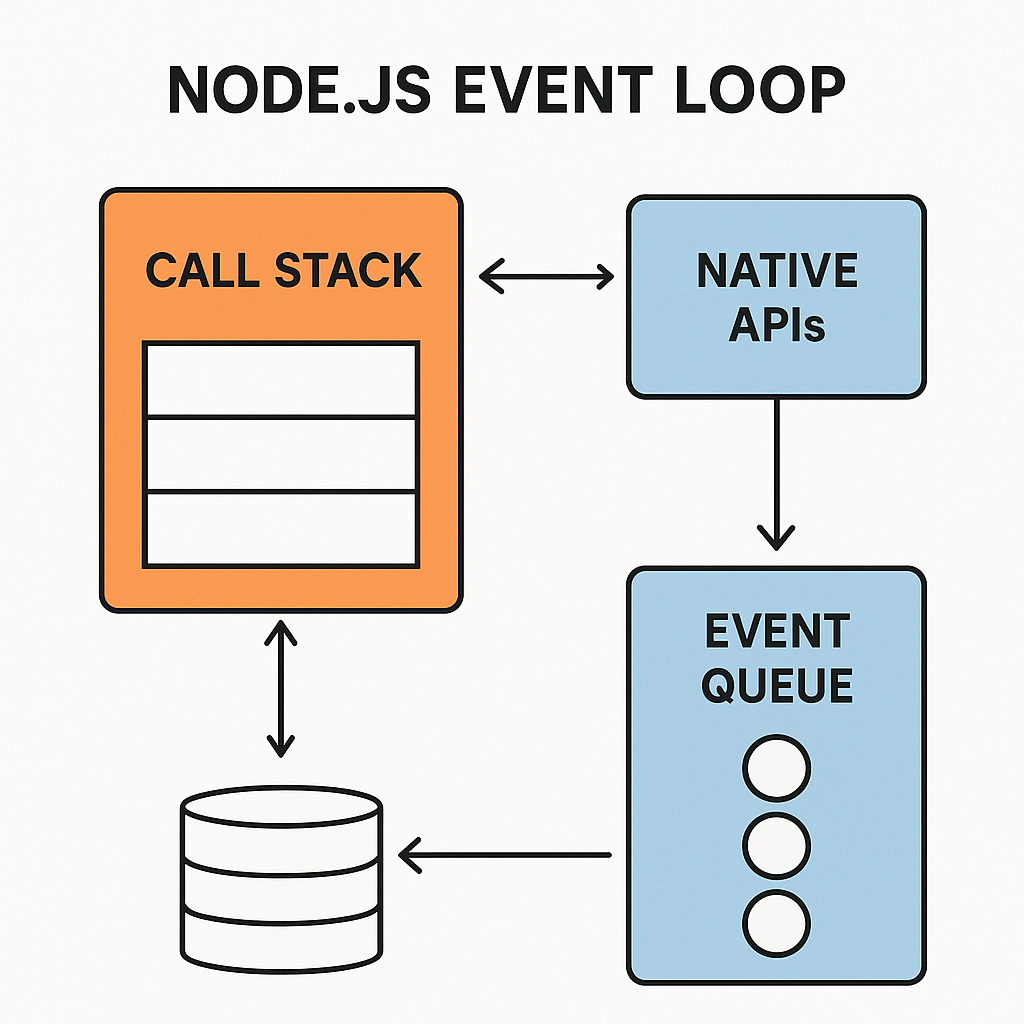
The Event Loop is a core concept that allows Node.js to perform non-blocking I/O operations. It continuously checks the message queue for events and executes their corresponding callback functions when the Call Stack is empty. This mechanism is key to Node.js’s efficiency.
5. Built-in Modules
Node.js comes with powerful built-in modules for common tasks:
http: For creating web servers and making HTTP requests.fs: For interacting with the file system (reading, writing, deleting files).path: For handling and transforming file paths.os: For retrieving operating system-related information.events: For working with events, a fundamental pattern in Node.js.
Advanced Node.js Concepts
Once you’re comfortable with the basics of Node.js, it’s time to explore some advanced topics that help you build faster and more powerful applications.
1. Working with Worker Threads and Child Processes
Use Worker Threads and Child Processes to perform heavy tasks in the background. These help you run CPU-heavy operations without slowing down your main application.
2. CommonJS vs ES Modules in Node.js
Understand the difference between require() and import. Learn when to use CommonJS and ES Modules, how module caching works, and how to organize your code for better performance.
3. Memory Management and Garbage Collection
Know how Node.js handles memory and clears unused data using garbage collection. Learn how to spot memory leaks and optimize your app’s memory usage to prevent crashes.
4. Node.js Security Best Practices
Secure your Node.js app by preventing common threats like XSS, SQL Injection, and data leaks. Use tools like helmet, validate user input, and store sensitive info like API keys safely.
5. Streams and Buffers in Node.js
Handle large files or real-time data using streams. Learn how to use readable, writable, and transform streams. Also, understand buffers for managing binary data like images or videos.
6. Using Clusters for Better Performance
Use the cluster module to run your Node.js app across multiple CPU cores. This helps handle more users at once by distributing the workload across different processes.
7. Improving Node.js Performance
Learn how to find and fix slow parts of your code using tools like clinic.js and Chrome DevTools. Use techniques like caching, lazy loading, and avoiding blocking operations to speed up your app.
8. Building Native Addons with C++ in Node.js
Use native addons to connect C++ code with Node.js for faster performance in critical areas like math operations or image processing. Use tools like node-gyp and N-API.
9. Advanced File and Network Handling
Go beyond basic file reading. Use the fs module for handling files efficiently and work with TCP, UDP, or TLS for building custom servers or network tools.
10. Scalable App Architecture in Node.js
Structure your Node.js projects using patterns like MVC, Clean Architecture, or Microservices. Use Dependency Injection (DI) to make your code easier to test and maintain.
11. Custom Middleware and Plugins
Build your own middleware in Express or Koa to handle requests, authentication, and logging. Use or create plugins to add features to your app without rewriting core logic.
12. Managing Background Jobs and Queues
Use tools like BullMQ or Agenda to handle background tasks like sending emails or processing data. Run jobs separately from your main app so users don’t experience delays.
13. Testing and Debugging in Node.js
Write tests to ensure your app works as expected. Use tools like Jest or Mocha to test functions and APIs. Debug problems with Chrome DevTools or VS Code’s built-in debugger.
14. Monitoring and Logging in Production
Keep an eye on your live app using logging tools like Winston or Pino, and monitor performance with platforms like Prometheus, Grafana, or ELK Stack. Set up alerts and health checks to catch issues early
These concepts are key to building advanced and high-performing Node.js applications.
Conclusion: Your Journey with Node.js Begins Now!
Node.js is a great choice for JavaScript developers who want to start building things on the server side. From learning what Node.js is and how to install it, to understanding async programming and creating advanced apps—there’s a lot to explore and learn.
Thanks to its non-blocking features and huge collection of packages through NPM, Node.js is perfect for modern web development. The key to getting better is practice. Try out small projects, write code regularly, and take advantage of the many learning resources out there. The more you build, the more confident you’ll become with Node.js.
FAQ’s:
1. Is Node.js a programming language ?
The answer is no. Node.js isn’t a language—it’s a runtime environment that runs JavaScript code. You can think of it as a platform that allows JavaScript to do things like access files, work with databases, and interact with the operating system—things that languages like Python or Java usually handle.
2. Is Node.js a framework ?
Again, the answer is no. Node.js is not a framework like Angular or React. Instead, it’s the base that lets you build apps, and on top of that base, you can use frameworks like Express.js to make development easier.
3. Who created Node.js and when ?
Node.js was created by Ryan Dahl in 2009.
4. What are Streams in Node.js ?
Streams are objects that allow reading or writing data in chunks rather than all at once. They are especially useful for processing large files.
5. What is middleware in Node.js ?
Middleware functions are functions that have access to the request and response objects and can modify them or end the request-response cycle.
6. What is Express.js?
Express.js is a minimal and flexible web application framework for Node.js that provides robust features for building web and mobile applications.
7. Is Node.js Frontend or Backend?
Many beginners wonder if Node.js is used for frontend or backend development. The clear answer is—Node.js is mainly used on the backend. It runs on the server and handles things like:
•Running real-time features like chat apps using WebSockets
•Creating RESTful APIs
•Sending web pages to the browser
•Connecting to and working with databases
•Managing user logins and authentication
Leave a Reply